동적 라우팅이 왜 필요했을까요?
내 프로젝트에서 Nginx를 두고 있는데,
아래와 같이 요청 정보에 따라 동적으로 라우팅 해줄 일이 생겼다.
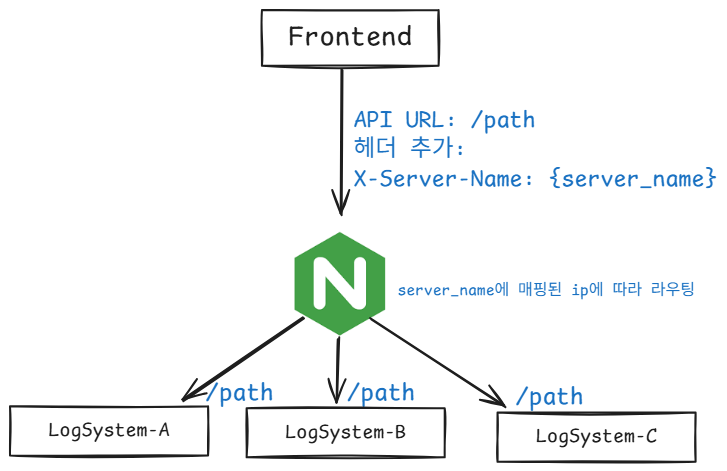
상황을 더 설명하자면 우리 관리자 cms에서는...
- 서버관리 화면에서 '서버명, IP'를 등록할 수 있다.
- 화면에서 /sys 로 시작하는 API 요청을 보낼 때, 서버명에 매핑된 IP로 라우팅할 수 있어야 한다.
- 서버명, IP 등록에 따른 라우팅 적용은 Nginx 무중단으로 이루어져야 한다.
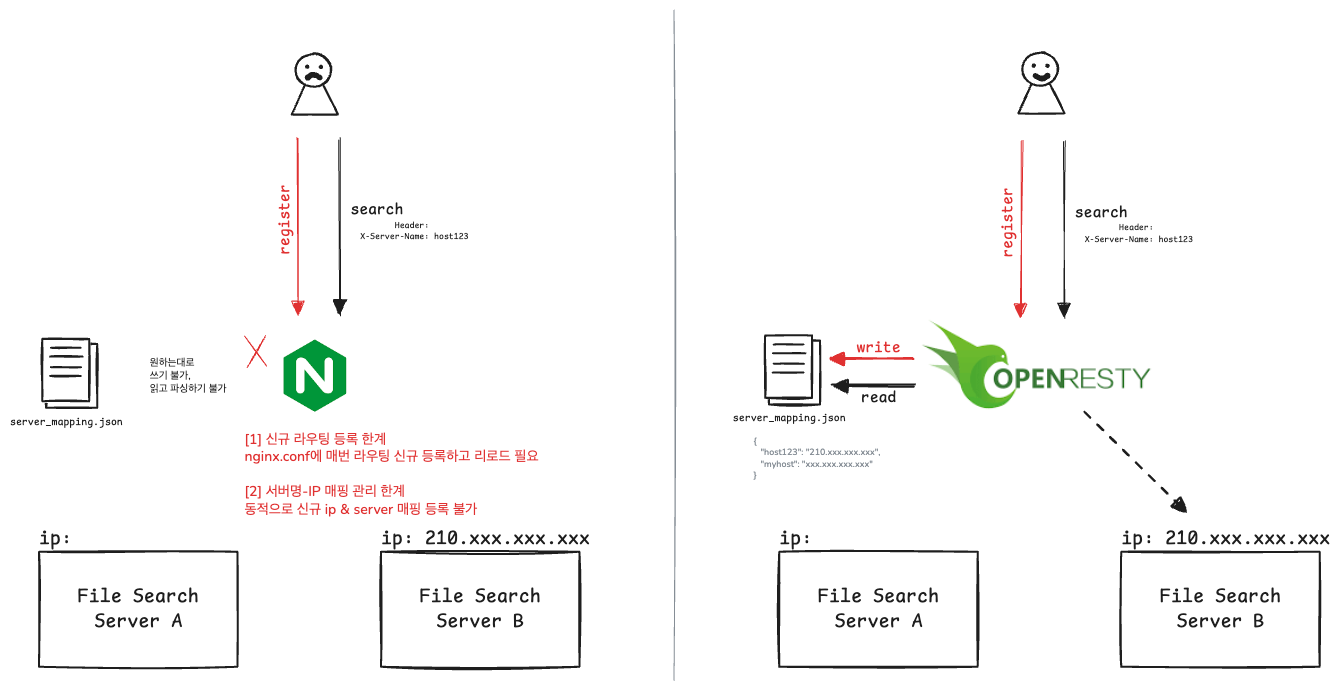
기존의 nginx에는 저런 요구사항을 실현하기 어려웠다. 서버명에 매핑된 ip로 라우팅하려면 매핑 데이터 관리가 필요한데, 정적인 특징이 있는 nginx는 어떤 파일에 read, write 작업이나 파싱하는 작업을 하기에는 부적절한 성격이다. 그렇다면 애초에 nginx에서 요청에 실린 ip로 라우팅하면 되지 않느냐라는 생각을 할 수 있는데, 보안상 ip 정보는 무조건 마스킹된 상황이다. Nginx에 별도 플러그인을 넣는 방법도 있겠지만 Lua 스크립트를 통해 자유롭게 확장할 수 있도록 OpenResty를 도입하기로 했다.
.
.
작업 방향:
프론트에서 백엔드로 요청 보낼 때, 헤더 X-Server-Name 값으로 서버명을 넣고, Lua를 통해 매핑 파일에 접근해서 매핑된 IP 주소를 가져와 동적으로 라우팅하는 것이 핵심이다. (그림 참고)
+ 좀 더... TMI가 궁금한가요?
이 관리자 페이지에 대해 설명을 좀 더 설명을 하자면, 그동안 CMS에서는 백엔드 서버 한대로만 요청을 보냈었다. 그 CMS 백엔드는 다른 서버들과 공통으로 사용하는 DB 데이터를 사용할 뿐이고 다른 서버로 라우팅할 일은 없었다. 그런데 이번 개발한 로그 조회 기능은 특히 로그 파일에 대한 파일 IO를 즉각 수행해 로그 문자열을 리턴하는 형태다. 즉 공통 저장소에서 읽어들여야 하는 케이스가 아니라, 각 서버에 라우팅하는 것이 필요했던 것이다.
이번 동적 라우팅 뿐만 아니라, 앞으로 어떤 확장이 필요할지 몰라서 OpenResty를 적용해두면 꽤나 유용할 것 같았다. 서로 다른 ip를 가진 서버(k8s pod 포함)에 요청을 보낼 일이 많고, 이번처럼 직접 라우팅 해야할 일이 생길지도 모른다. (이번 케이스는 특정 Host의 파일시스템에 접근해서 로그 파일을 읽어오는 경우였다)
OpenResty 도입
OpenResty는 Nginx에 LuaJIT를 통합한 고성능 웹 플랫폼이다. 표준 Nginx가 정적 설정 파일에 의존한다면, OpenResty는 런타임에 Lua 스크립트로 동적인 처리가 가능하다는 차이가 있다.
마이크로서비스 환경에서 서비스 인스턴스들이 동적으로 생성/제거되면서 기존 Nginx의 정적 라우팅으로는 한계가 있었다. 이를 해결하기 위해 OpenResty로 변경하여 다음과 같은 동적 라우팅 시스템을 구축했다
1. 서버 등록: CMS 화면에서 '서버명과 IP'를 등록하면 `server_mapping.json` 파일에 매핑 정보가 저장된다.
2. 동적 라우팅: `/sys/*` 요청 시 `X-Server-Name` 헤더를 통해 라우팅 대상을 지정하면, Lua 스크립트가 매핑 파일을 읽어 해당 IP로 자동 라우팅한다.
.
.
그래서 어떤 구조를 만들어야 했는지
좀 더 상세하게 정리해보자.
.
.
[1] 나에게 필요한 OpenResty 구조 갖추기
갖춰나가야 했던 단계는 아래와 같다.
1. 사용하려는 openresty 이미지의 디렉토리 구조 파악하기
2. 내가 정한 경로에 lua 스크립트와 server_mapping.json 파일 준비 (아래 Dockerfile 참고)
* 나는 /opt/openresty/ 하위에 다 뒀음
3. /usr/local/openresty/nginx/conf/nginx.conf 경로에 우리 cms 전용 nginx.conf 복사
* nginx.conf는 2번에 해당하는 경로를 참조할 수 있도록 세팅되어있어야 한다.
* 꼭 저 경로에 넣지 않더라도 openresty 실행 시 -c $INSTALL_PATH/nginx.conf 옵션 넣으면 원하는 경로에 있는 nginx.conf 사용 가능하다.
4. 이제 openresty 실행하면 위 nginx.conf 내용대로 웹서버 부팅 완료다.
[Dockerfile] 읽어보면 위 구조가 더욱 잘 이해가 될것이다.
FROM {사내 저장소}/openresty/openresty:centos

# 리액트 빌드 결과물 복사하고
COPY ./dssst /usr/share/nginx/html

# lua 스크립트랑 필요한거 이 위치에 뒀음
COPY ./openresty/lua /opt/openresty/lua
COPY ./openresty/server_mapping.json /opt/openresty/server_mapping.json

EXPOSE {우리 cms 포트}

CMD ["/usr/local/openresty/bin/openresty", "-g", "daemon off;"]
[2] Lua Script 작성하기
동적 라우팅을 위한 lua는 딱 2개를 뒀다.
1. [매핑파일 read] 서버명에 매핑된 IP 읽어와서 동적 라우팅 담당 (dynamic_router.lua)
2. [매핑파일 write] 서버명과 IP 등록 담당 (server_register.lua)
- 동적 라우팅 담당 (dynamic_router.lua)
-- dynamic_router.lua: X-Server-Name 헤더 기반 동적 라우팅
local cjson = require "cjson"
local io = require "io"

-- 서버 매핑 파일 경로
local server_mapping_file = "/opt/openresty/server_mapping.json"

-- 서버 매핑 파일 로드 함수
local function load_server_mapping()
    local file = io.open(server_mapping_file, "r")
    if not file then
        ngx.log(ngx.WARN, "Server mapping file not found: " .. server_mapping_file)
        return {}
    end

    local content = file:read("*all")
    file:close()

    if not content or content == "" then
        ngx.log(ngx.WARN, "Server mapping file is empty")
        return {}
    end

    local ok, mapping = pcall(cjson.decode, content)
    if not ok then
        ngx.log(ngx.ERR, "Failed to parse server mapping JSON: " .. (mapping or "unknown error"))
        return {}
    end

    return mapping
end

-- X-Server-Name 헤더에서 호스트명 추출
local host = ngx.var.http_x_server_name

if not host or host == "" then
    ngx.log(ngx.WARN, "X-Server-Name header is missing or empty")
    ngx.status = 400
    ngx.say("Bad Request: X-Server-Name header is required for /sys requests")
    ngx.exit(400)
end

-- 서버 매핑 파일에서 호스트에 대응하는 IP 조회
local mapping = load_server_mapping()
local ip_address = mapping[host]

if not ip_address then
    ngx.log(ngx.WARN, "Server mapping not found for: " .. host)
    ngx.status = 404
    ngx.say("Not Found: Server '" .. host .. "' is not registered")
    ngx.exit(404)
end

-- 동적 라우팅 설정
-- upstream 변수 설정
ngx.var.target_server = ip_address

ngx.log(ngx.INFO, "Dynamic routing: " .. host .. " -> " .. ip_address)
- 서버명과 IP 등록 담당 (server_register.lua)
-- server_register.lua: register하는 특정 엔드포인트 처리를 위함
local cjson = require "cjson"
local io = require "io"

-- 서버 매핑 파일 경로
local server_mapping_file = "/opt/openresty/server_mapping.json"

-- POST 요청만 허용
if ngx.var.request_method ~= "POST" then
    ngx.status = 405
    ngx.header["Allow"] = "POST"
    ngx.header["Content-Type"] = "application/json"
    ngx.say(cjson.encode({result = {success = false, error = "Method Not Allowed"}}))
    ngx.exit(405)
end

-- 요청 body 읽기
ngx.req.read_body()
local body = ngx.req.get_body_data()

if not body then
    ngx.status = 400
    ngx.header["Content-Type"] = "application/json"
    ngx.say(cjson.encode({result = {success = false, error = "Empty request body"}}))
    ngx.exit(400)
end

-- JSON 파싱
local ok, request_data = pcall(cjson.decode, body)
if not ok then
    ngx.status = 400
    ngx.header["Content-Type"] = "application/json"
    ngx.say(cjson.encode({result = {success = false, error = "Invalid JSON"}}))
    ngx.exit(400)
end

-- 필수 필드 검증
local ip_address = request_data.ipAddress
local host = request_data.host
local service_name = request_data.serviceName

if not ip_address or not host or not service_name then
    ngx.status = 400
    ngx.header["Content-Type"] = "application/json"
    ngx.say(cjson.encode({result = {success = false, error = "ipAddress, host, and serviceName are required"}}))
    ngx.exit(400)
end

-- 길이 검증 (최대 100자)
if string.len(ip_address) > 100 or string.len(host) > 100 or string.len(service_name) > 100 then
    ngx.status = 400
    ngx.header["Content-Type"] = "application/json"
    ngx.say(cjson.encode({result = {success = false, error = "Field length exceeds 100 characters"}}))
    ngx.exit(400)
end

-- 기존 매핑 파일 로드
local function load_existing_mapping()
    local file = io.open(server_mapping_file, "r")
    if not file then
        return {}
    end

    local content = file:read("*all")
    file:close()

    if not content or content == "" then
        return {}
    end

    local ok, mapping = pcall(cjson.decode, content)
    if not ok then
        ngx.log(ngx.ERR, "Failed to parse existing mapping file")
        return {}
    end

    return mapping
end

-- 매핑 파일 저장
local function save_mapping(mapping)
    local file = io.open(server_mapping_file, "w")
    if not file then
        ngx.log(ngx.ERR, "Failed to open mapping file for writing")
        return false
    end

    local ok, json_str = pcall(cjson.encode, mapping)
    if not ok then
        file:close()
        ngx.log(ngx.ERR, "Failed to encode mapping to JSON")
        return false
    end

    file:write(json_str)
    file:close()
    return true
end

-- 기존 매핑 로드 및 업데이트
local mapping = load_existing_mapping()
mapping[host] = ip_address

-- 파일에 저장
if not save_mapping(mapping) then
    ngx.status = 500
    ngx.header["Content-Type"] = "application/json"
    ngx.say(cjson.encode({result = {success = false, error = "Failed to save server mapping"}}))
    ngx.exit(500)
end

-- 서버 등록 성공 로깅
ngx.log(ngx.INFO, "Server registered: " .. host .. " -> " .. ip_address .. " (service: " .. service_name .. ")")
nginx.conf에서는 위 lua를 참조해서 동적으로 무언가를 할 수 있게 된다.
[3] 매핑 파일은 server_mapping.json
server_mapping.json을 통해 서버명-IP 맵을 관리했다.
가장 간단한 해결책일 것 같아서다!
관리자의 CMS라서 파일 동시 쓰기 충돌 케이스는 문제가 되지 않을 것이다.
 {
    "user-service": "192.168.1.100",
    "order-service": "192.168.1.101",
    "payment-service": "payment-pod-xyz"
  }
프론트에서 이렇게 요청을 보내면
fetch('/sys/~~/~~~', {
headers: {
'X-Server-Name': 'user-service'
}
})
위 map에서 IP를 찾아와 동적으로 라우팅할 수 있다.
[4] Lua를 사용하도록 nginx.conf 작성
필요한 기능을 lua 스크립트로 작성했다면,
lua를 사용하도록 nginx.conf를 갖추면 된다.
조금의 수정만 하면 된다.
server {
    ...

    # 동적 라우팅이 적용된 엔드포인트
    location /sys {
        # X-Server-Name 헤더 기반 동적 라우팅
        set $target_server "";
        access_by_lua_file /opt/openresty/lua/dynamic_router.lua;
        ...
        proxy_pass http://$target_server:{sys-port}/sys;  # <-- 집쭝
    }

    # 서버 등록 API (서버 매핑 정보 업데이트)
    location /api/~~/register {
        access_by_lua_file /opt/openresty/lua/server_register.lua;
        ...
        proxy_pass http://api-server:{api-port}/api/~~/register;
    }
}
⬇️ 한편.. 또다른 작업기록
(인터넷 불가 상황에서의 설치 이야기므로 읽지 않아도 된다) 이 프로젝트는 컨테이너 외에 vm에도 설치되는데, 특정 OS의 vm 설치 자동화 패키지를 sh로 세팅해뒀다. 그 자동화 패키지에는 특정 OS에서 필요한 의존성 등의 rpm들이 있다. 그것도 OpenResty 도입의 변화에 맞춰 업뎃해줘야 했다.
큰 변동은 없구 이 정도 교체가 있었음..
- nginx 대신 openresty 넣기
- 새로운 lua 스크립트랑, lua를 사용하도록 수정한 nginx.conf 집어넣기
- openresty에 필요한 의존성 추가 (pcre 추가)
* openresty 컴파일 할 때, pcre tar.gz 압축 푼 경로를 옵션에 넣어주는 추가사항이 있던 것임
checking for PCRE library ... not found
checking for PCRE library in /usr/local/ ... not found
checking for PCRE library in /usr/include/pcre/ ... not found
checking for PCRE library in /usr/pkg/ ... not found
checking for PCRE library in /opt/local/ ... not found

./configure: error: the HTTP rewrite module requires the PCRE library.
./configure \
  --prefix="$NGINX_INSTALL_PATH" \
  --sbin-path="$NGINX_INSTALL_PATH/sbin/openresty" \
  --conf-path="$NGINX_INSTALL_PATH/conf/nginx.conf" \
  --error-log-path="$NGINX_INSTALL_PATH/logs/error.log" \
  --http-log-path="$NGINX_INSTALL_PATH/logs/access.log" \
  --pid-path="$NGINX_INSTALL_PATH/logs/nginx.pid" \
  --lock-path="$NGINX_INSTALL_PATH/logs/nginx.lock" \
  --http-client-body-temp-path="$NGINX_INSTALL_PATH/temp/client_temp" \
  --http-proxy-temp-path="$NGINX_INSTALL_PATH/temp/proxy_temp" \
  --http-fastcgi-temp-path="$NGINX_INSTALL_PATH/temp/fastcgi_temp" \
  --with-pcre="$PCRE_SRC_DIR" \  <<<< 이런 추가
  --with-pcre-jit \
  --with-openssl="$OPENSSL_SRC_DIR" \
  --with-luajit \
  --with-file-aio \
  --with-http_realip_module \
  --with-http_ssl_module
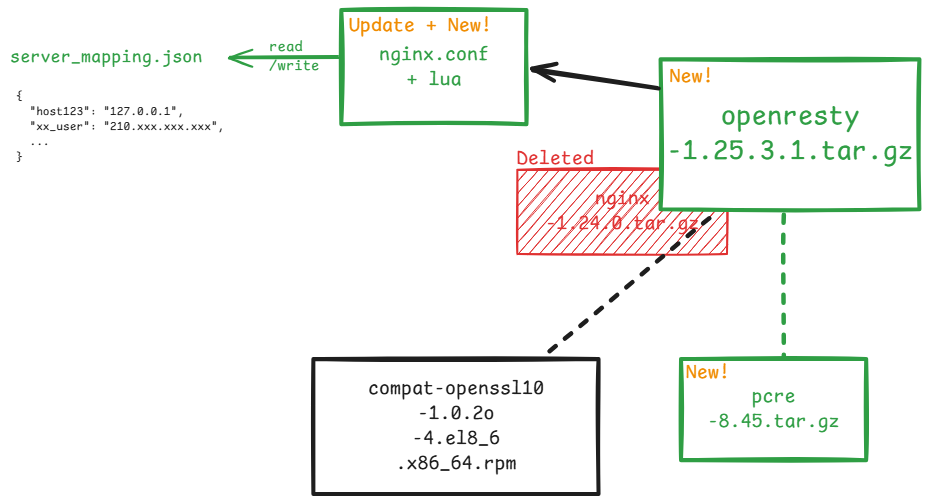
검정: 기존에 사용하던 것
초록: OpenResty 추가와 그로 인한 업데이트
빨강: Nginx 삭제
🔎 테스트
openresty를 띄우고, 타겟 서버를 2대 띄우고,
각 {타겟서버}/sys/~~ 로 올바르게 라우팅되는지 테스트 완료했다.
각 타겟 서버의 파일 시스템에서 내가 원하는 로그 파일을 잘 조회함을 확인했다.
🔎 결론
OpenResty + Lua의 유연한 스크립트 작성은...
동적 라우팅을 완전히 수행해줬고...
nginx 프로세스 중단이나 리로드가 필요 없다는 점...
확장하기도 좋다는 점..
보안 요건이 추가되면 Lua로 추가할 수도 있겠고...
앞으로 여러모로 좋을 것 같다.
참고 자료: